
Intro to iPhone App
Welcome to Topo Maps+ for the iPhone! If you haven't downloaded the app yet, you can click here to get started!
Let's start with an overview of the buttons displayed on the main screen of the app:
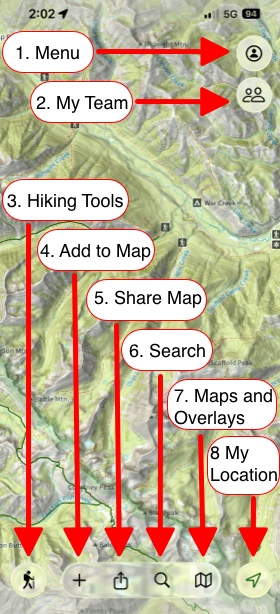
- Menu:
Here you can access saved Routes, Tracks, Waypoints, Regions, Folders, Teams, Settings, and the Help Center.
- My Team:
Here you can easily share your location with your Team Members.
- Hiking Tools:
Enjoy trail tools at your fingertips.
- Add to Map:
Create Waypoints, Routes, Regions, or import maps.
- Share:
You can send, export, or print your data here.
- Search:
Use this option to find trails, parks, mountains, or your own data.
- Maps and Overlays
Switch between Preset and Advanced dashboards using these tools.
- My Location:
- Tap once → Center on your location
- Tap twice → Rotate map to compass
- Tap three times → Hide location dot
(Requires location permission: Settings > Topo Maps+)
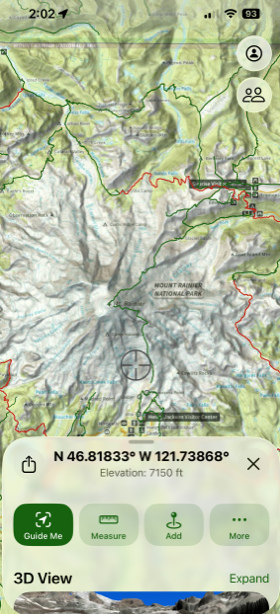
- Long Press Anywhere:
Discover the quick menu options: add waypoint, share location, Line of Sight, Guide Me, coordinates & elevation.
Why the iPhone app?
Most Topo Maps+ users are on iPhone — it’s always in your pocket, easy to hold, and the GPS works even without cell service, making it perfect for the trail.
If you prefer planning on a bigger screen, you can use your iPad or Mac at home and then sync everything across devices. Learn how to here.